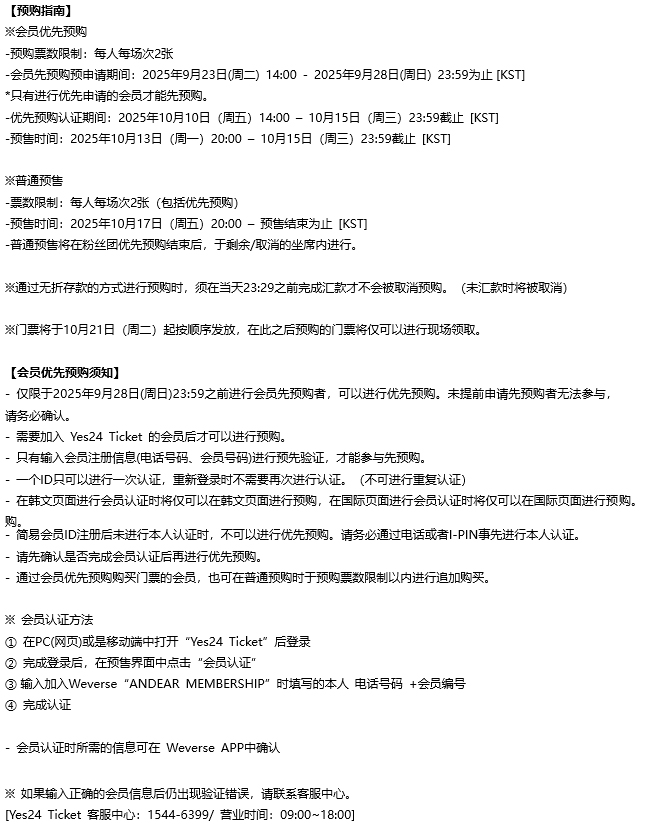
[예매안내]
※멤버십 선예매
-매수제한: 회차당 1인 2매
-멤버십 선예매 사전 신청기간: 2025년 9월 23일(화) 14:00 - 2025년 9월 28일(일) 23:59 까지 [KST]
*사전 신청을 진행하신 멤버십 회원만 선예매 진행이 가능합니다.
-선예매 인증기간: 2025년 10월 10일(금) 14:00 - 10월 15일(수) 23:59 까지 [KST]
-예매기간: 2025년 10월 13일(월) 20:00 - 10월 15일(수) 23:59 까지 [KST]
※일반 예매
-매수제한: 회차당 1인 2매 (선예매 포함)
-예매기간: 2025년 10월 17일(금) 20:00 - 예매 마감시간까지 [KST]
-일반 예매는 멤버십 선예매 후 잔여/취소 좌석에 한하여 진행됩니다.
※무통장입금으로 예매한 경우 예매 당일 23:29까지 입금하셔야 예매가 취소되지 않습니다. (미 입금 시 취소)
※10월 21일(화)부터 순차적으로 일괄 배송될 예정이며, 이후 예매하시는 분들은 현장 수령만 가능합니다.
[멤버십 선예매 안내]
- 2025년 9월 28일(일) 23:59 까지 멤버십 선예매 사전 신청을 진행하신 분들에 한하여 선예매 진행이 가능합니다. 선예매 사전 신청을 하지 않은 이용자는 참여가 불가하오니 반드시 확인해 주시기 바랍니다.
- 예스24티켓에 가입 되어있어야 예매 가능합니다.
- 멤버십 가입정보(전화번호, 멤버십 번호)를 입력하여 사전 인증을 해야만, 선예매 참여가 가능합니다.
- 한 개의 ID로 한 번의 인증만 가능하며, 재 로그인 시 다시 인증하지 않아도 됩니다. (중복 인증 불가)
- 멤버십 인증을 국문 페이지에서 진행했을 경우, 국문 페이지에서만 예매 가능하며, 멤버십 인증을 글로벌 페이지에서 진행했을 경우, 글로벌 페이지에서만 예매 가능합니다.
- 간편 회원 아이디 가입 후 본인 인증을 하지 않을 경우, 선예매가 불가능합니다. 반드시 휴대전화나 I-PIN을 통해서 사전에 본인인증을 받으시기 바랍니다.
- 선예매 멤버십 인증이 완료되었는지 확인 후 예매 진행 부탁드립니다.
- 멤버십 선예매를 통해 티켓을 구매하신 회원들도 일반 예매 시 매수 제한 내에서 추가 구매가 가능합니다.
※ 멤버십 회원 인증방법
① PC(웹) 또는 모바일에서 ‘예스24티켓’ 접속 후 로그인
② 로그인 완료 후, 예매페이지 내 ‘멤버십 인증’ 클릭
③ 위버스 ‘ANDEAR MEMBERSHIP’ 가입 시 기재한 본인 전화번호 + 멤버십 번호 입력
④ 인증완료
- 멤버십 인증에 필요한 정보는 위버스 앱에서 확인 가능합니다.
※ 정확한 멤버십 회원정보 기입 후에도 인증 오류가 날 경우에는 예매처로 문의 바랍니다.
[예스24티켓 고객센터: 1544-6399/ 운영시간: 09:00~18:00]
[Information on Ticket Purchase]
※ MEMBERSHIP Pre-Ticket Purchase
- MEMBERSHIP Pre-Ticket Purchase Limit: 2 tickets per person (per performance)
- Application period for MEMBERSHIP Pre-Ticket Reservation: September 23rd, 2025 (Tue) 14:00 - September 28th, 2025 (Sun) 23:59 [KST]
*Only membership members who have applied in advance can pre-purchase.
- MEMBERSHIP Verification Period: October 10th, 2025 (Fri) 14:00 - October 15th, 2025 (Wed) 23:59 [KST]
- MEMBERSHIP Pre-Ticket Purchase Period: October 13th, 2025 (Mon) 20:00 - October 15th, 2025 (Wed) 23:59 [KST]
※ General Ticket Purchase
- General Ticket Purchase Limit: 2 tickets per person per performance (including Pre-Ticket Purchase)
- General Ticket Purchase Period: October 17th, 2025 (Fri) 20:00 - until the end of purchase period [KST]
- General ticket purchases are limited to remaining/canceled seats after the MEMBERSHIP Pre-Ticket Purchase is over.
※ If you have made a purchase through direct deposit, you must make a deposit by 23:29 on the day of purchase in order to avoid cancellation. (Unpaid purchases will be canceled.)
※ The tickets will be shipped sequentially in bulk from October 21st, 2025 (Tue) and those who make a purchase after that can only pick up on-site.
[Guidelines for MEMBERSHIP Pre-Ticket Purchase]
- Pre-purchase is available only to those who have applied for MEMBERSHIP pre-purchase by 23:59 on Sunday, September 28th, 2025. Users who have not applied for pre-purchase in advance will not be able to participate, so please make sure to check.
- Must be a member of Yes24 Ticket to make a purchase.
- You must pre-verify by entering your MEMBERSHIP registration information (phone number, membership number) to participate in the Pre-Ticket Purchase.
- Only one verification is possible with one ID, and it does not require re-verification when logging in again. (Duplicate verification is unavailable.)
- If MEMBERSHIP verification is done on the Korean page, MEMBERSHIP pre-ticket purchases are only possible on the Korean page. If MEMBERSHIP verification is done on the global page, MEMBERSHIP pre-ticket purchases are only possible on the global page.
- If you do not verify your identity after signing up with the linked ID, you will not be able to proceed Pre-Ticket Purchase. Be sure to verify yourself in advance through your mobile phone or I-PIN.
- Please proceed with ticket purchase after confirming that MEMBERSHIP verification has been completed.
- Members who have purchased tickets through the MEMBERSHIP Pre-Ticket Purchase are also eligible for additional purchases within the purchase limit for general ticket purchases.
※ MEMBERSHIP Verification Process
① Log in to Yes24 Ticket on PC (web) or mobile app
② After accessing the ticket purchase page, click ‘Verify MEMBERSHIP’
③ Enter your phone number + membership number that you entered when signing up for Weverse ‘ANDEAR MEMBERSHIP’.
④ Verification Completed
- You can check all the information necessary for MEMBERSHIP verification on the Weverse App.
※ If a verification error occurs even after entering the correct membership information, please contact the reservation office.
[Yes24 Ticket Customer Center: 1544-6399 / Operation Hours: 09:00~18:00]